UDISE Plus Inter-State Student Transfer Guide: How to Import Students Across State Boards
📋 Table of Contents (click to collapse)
- The Complexity of Inter-State Student Transfer in UDISE Plus SDMS
- Understanding the National Permanent Education Number (PEN) System
- Step-by-Step: How to Transfer Out a Student to the National Drop Box
- How to Import Migrated Students Across Different State Boards
- Resolving Sync Blocks and Mismatched State Portals
- Document Verification Guidelines for Out-of-State Migration Cases
- Frequently Asked Questions (FAQs)
The Complexity of Inter-State Student Transfer in UDISE Plus SDMS
The complexity of transferring students between schools in different states has historically been a significant challenge for educational departments. Each state board has its own independent database, registration schedule, and local verification rules. When a student migrates from one state to another, their academic record can easily get lost or duplicated in the database. To solve this problem, the national portal provides a standardized inter state student transfer workflow. This system ensures that a student's permanent education history remains linked under a single permanent education number (PEN) across all boards.
Under the national guidelines, schools are strictly prohibited from creating fresh profiles for migrated students who already possess a PEN. Creating a duplicate profile violates database sync rules and can result in the student losing their progression history. Instead, school coordinators must use the official UDISE Plus inter state student transfer utility to import the active record. This guide provides a detailed walkthrough of the Drop Box migration process, showing you how to retrieve out-of-state student records and verify their details for audit compliance.
Understanding the National Permanent Education Number (PEN) System
At the center of this transfer framework is the Permanent Education Number (PEN). The PEN is a unique 11-digit national identifier assigned to every student registered in the UDISE Plus database. Once generated, this number remains active throughout the student's K-12 career, regardless of state changes. Understanding the PEN system is the first step in mastering the inter state student transfer workflow. The PEN allows the portal to track a student's academic journey across different boards, from primary school up to higher secondary graduation.
The search utility on the portal makes it easy to find a student's PEN, even if they migrated from a remote district. Nodal officers can use the student's Aadhaar card and year of birth to search the national database. If the search returns no records, it means the student's previous enrollment was never registered in the portal. In this case, you must contact your block resource center to get authorization for a fresh admission. However, for most migrated students, the PEN search is successful, allowing you to proceed with the UDISE Plus inter state student transfer.
Inter-State Migration vs. Local Transfer Comparison
| Transfer Option | PEN Record Status | Previous School Action | New School Action |
|---|---|---|---|
| Within-State Transfer | Active in state database | Mark Left School with TC in Progression | Import via State Student Module using PEN |
| Inter-State Migration | Shifted to National Drop Box | Complete progression & send to Drop Box | Use National Import Module with PEN & DOB |
Step-by-Step: How to Transfer Out a Student to the National Drop Box
Before you can import a student from another state, the previous school must release their record. In UDISE Plus, this release process is called shifting the student to the Drop Box. The Drop Box is a virtual holding pool for inactive student records. When a student leaves a school, the coordinator must go to their progression dashboard and mark the student as left with a Transfer Certificate (TC). This action shifts the student's profile into the Drop Box, making it available for the UDISE Plus inter state student transfer.
If the previous school fails to shift the student to the Drop Box, their profile remains locked under that school's active roster. In this scenario, you will see a 'Record Locked in Another School' error when you attempt to import them. We advise coordinators to contact the principal of the previous school immediately and request them to release the profile. Once the record is shifted to the Drop Box, it enters the central pool, enabling the new school to initiate the UDISE Plus inter state student transfer.
Accessing the Reports Module
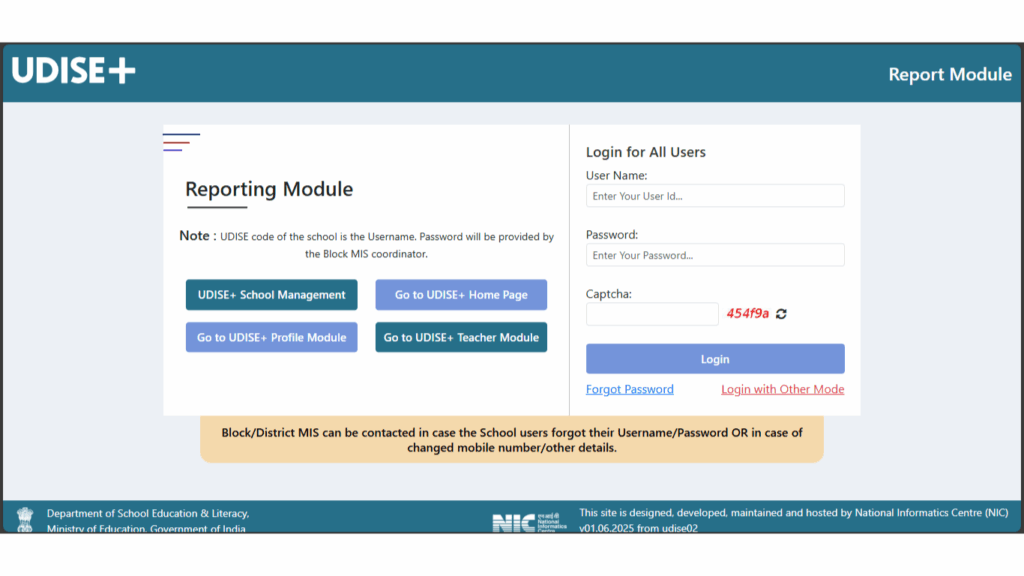
Figure 1: Navigating to the UDISE+ reports portal to inspect school-wise Drop Box counts.
How to Import Migrated Students Across Different State Boards
Once the previous school has shifted the record, you can start the import process. Log into the UDISE+ SDMS module and select the current academic year. Navigate to the Import Module card on the main dashboard and click on Inter-State School Transfer. This opens the import panel. Here, enter the student's Permanent Education Number and their Date of Birth as recorded on their Transfer Certificate. Click Go to fetch the profile details from the Drop Box, showing how the UDISE Plus inter state student transfer is initiated.
The screen will display the student's name, parent details, and previous school history. Verify these details carefully before clicking the import button. Select the appropriate Class, Section, and Stream (for higher secondary classes) that the student is joining. Enter the admission date and admission number from your school register. Click Import Student to save the profile. The student's name will now appear on your active school roster, completing the UDISE Plus inter state student transfer workflow.
Inter-State PEN Import Workflow
- Search for the student's PEN using the Search PEN utility (Aadhaar & birth year).
- Check if the student is active in the previous school's Drop Box.
- Navigate to the Import Module on the SDMS portal.
- Enter the student's Permanent Education Number (PEN) and Date of Birth.
- Select the Class and Section for the new admission and click Import.
Resolving Sync Blocks and Mismatched State Portals
Resolving sync blocks is a common task when managing inter-state transfers. Since some states use independent educational portals, the database synchronization can take time to complete. If the imported student's profile does not show up on your dashboard immediately, wait at least 24 hours for the midnight sync cycle to finish. Working on the portal during off-peak hours (early morning or late evening) is recommended for a faster response, helping you complete the UDISE Plus inter state student transfer without delays.
If the search PEN utility fails to find a migrated student's record even when the Aadhaar is correct, the issue is likely due to a name mismatch between the Aadhaar card and the previous school records. In this situation, ask the student's parents for a copy of the previous school report card. Search the portal using the previous school's UDISE code and the student's name to find the registered PEN. This is a critical troubleshooting step when managing the UDISE Plus inter state student transfer.
Roster Verification Panel
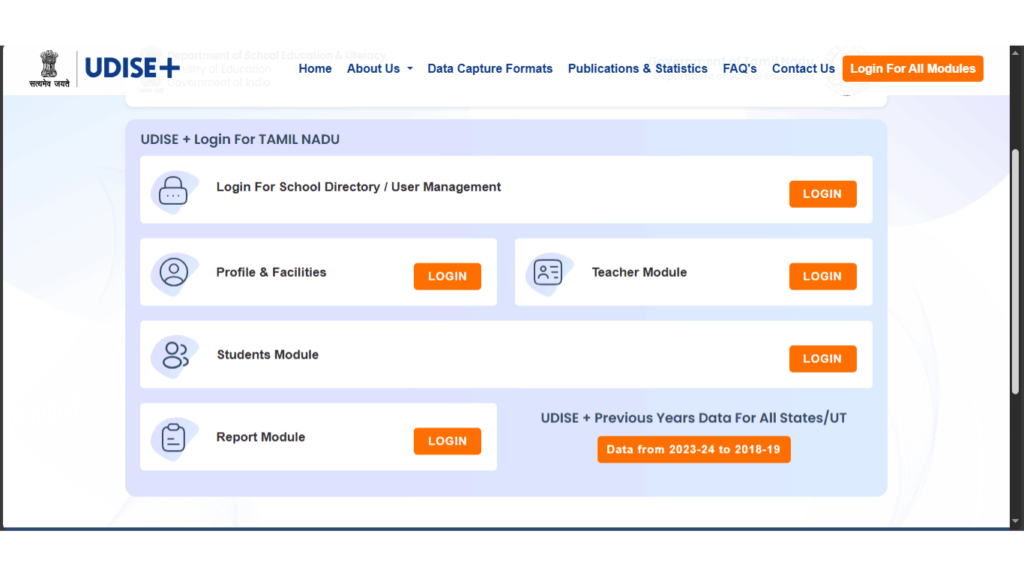
Figure 2: Viewing active student rosters to verify imported profiles.
Document Verification Guidelines for Out-of-State Migration Cases
Maintaining physical document verification logs is essential for audit compliance. For every inter-state transfer, keep a copy of the out-of-state Transfer Certificate, the counter-signature of the education officer (if required by your state board), and the student's verified Aadhaar card. Having these physical folders organized in your office makes it easy to verify data entries if the district office runs database audits, protecting your UDISE Plus inter state student transfer records from compliance queries.
Lastly, ensure that the imported student's progression details are mapped correctly. If the student was imported middle of the session, verify that their academic performance and attendance logs are carried forward. A clean transfer process ensures that the student remains eligible for scholarships, board exams, and state-level benefits. Following these best practices will help you complete all UDISE Plus inter state student transfer tasks successfully.
Out-of-State Migration Checkpoints
- Always collect physical Transfer Certificates (TC) for out-of-state transfers.
- Ensure the previous school has finalized the student's progression.
- Submit out-of-state migration requests to the block BRC for unlocking if blocked.
- Verify identity parameters on the imported profile before freezing data.
To complete the udise plus inter state student transfer, school coordinators must ensure that the student's previous school has completed the progression. If the previous school has pending data entries for the term, the portal will block the import API. Coordinators should verify the progression status of the source school before trying to run the udise plus inter state student transfer.
Furthermore, when running the udise plus inter state student transfer, you must verify that the student's social category details are updated. Since reservation categories differ between states, the operator must manually review the GP profile after import to ensure alignment with local state board classification guidelines for the udise plus inter state student transfer.
It is also worth noting that the system to manage the udise plus inter state student transfer utilizes national database API keys. In case of server maintenance at the national level, the inter-state import option may throw connection timeout warnings. Mis operators should wait 24 hours and run the transfer during off-peak hours to complete the udise plus inter state student transfer.
For private schools operating in metropolitan regions with high student migration, the principal should appoint a dedicated transfer coordinator. Having a single clerk manage the out-of-state registry ensures that all import applications are submitted to the BRC office promptly, speeding up the udise plus inter state student transfer procedure.
We recommend that school clerks keep a register of all out-of-state admission files. Documenting the student's name, PEN, previous school UDISE code, and date of import helps in tracking database sync progress and provides a reliable reference during annual inspections of the udise plus inter state student transfer records.
In addition to the database verification, school authorities must emphasize administrative training for their staff. Managing state-wide educational registries requires familiarity with national data capture formats. Nodal officers should participate in block-level workshops conducted by the district educational department. These workshops cover details of student enrollment variables, facilities management reporting, and compliance requirements under the National Education Policy.
Furthermore, keeping physical records filed in the school office is highly recommended. Photocopies of Aadhaar cards, birth certificates, parent consent slips, and board affiliation registers should be organized in individual student files. Having this offline directory makes it easy for coordinators to verify demographics if a mismatch alert occurs, reducing manual entry mistakes and audit delays.
Always keep a backup log of portal transactions and modifications. In case of database sync failures, the technical support team will require transaction IDs or screenshots to resolve the issue from the backend server. Maintaining this log protects the school from data loss and ensures that progression lists can be finalized smoothly during the annual term deadlines.
School management should also cooperate with the district MIS coordinator to resolve any technical blocks that cannot be resolved through the school portal interface. The block coordinator has administrative overrides to reset credentials, delete duplicate profiles, and transfer active records from closed or unrecognized schools.
By establishing these compliance habits early in the academic session, schools can avoid the peak period rush and ensure error-free submissions. A clean database registry is vital for securing national funding, maintaining educational statistics, and ensuring student eligibility for scholarship payouts.
The synchronization of records between the state portals and the national database is scheduled at regular intervals, usually at midnight. During this sync window, updates made to student profiles are validated and propagated across all active modules. If you make modifications during school hours, the changes will not be visible on the public dashboard immediately. We advise school operators to wait at least 24 hours before checking the status of updated student registries to ensure the sync cycle has completed.
Data entry operators should also pay close attention to the school directory configurations. If the category of the school is incorrectly mapped (for example, primary school mapped as upper primary), the portal will throw system validation errors during data submission. Any category or management changes must be submitted via an official application to the District Education Officer for backend correction.
To optimize the speed of the portal during peak hours, it is helpful to disable browser extensions and clear the browser cache regularly. Heavy traffic on the UDISE+ servers can cause the page to freeze or fail to save data. Working during early morning hours (before 9 AM) or late evening hours (after 7 PM) is highly recommended for smooth, uninterrupted data entry.
Under the new guidelines of the Ministry of Education, student progress tracking has become more rigorous. The system tracks learning outcomes, attendance percentages, and retention rates across all state boards. This unified tracking helps in identifying areas with high dropout rates, enabling the government to direct resources and infrastructure grants to schools that need them the most.
For schools located in remote or rural regions with limited internet connectivity, the department provides offline Excel templates (Data Capture Format sheets). Teachers can fill in the student profiles offline in these sheets and then upload them in bulk when a stable connection is available. This offline option is a major benefit for rural administrators.
The role of block coordinators (BRC) and cluster resource coordinators (CRC) is critical in maintaining the quality of education statistics. They act as the first line of audit, checking school records for anomalies, duplicate entries, or missing data points. Before finalizing your school profile, ensure that you have cleared all queries raised by your local CRC officer.
In case of a duplicate profile warning where the active record belongs to an unrecognized private school, the BRC coordinator can issue a force-migration command. Since unrecognized schools do not have active portal credentials, their student profiles must be managed directly by the block education office to prevent students from losing their PEN history.
The implementation of the automated APAAR ID card is another major step under the National Education Policy 2020. This card acts as a lifelong digital credit registry for students, storing their academic credits, exam certificates, and co-curricular achievements. For the APAAR card to be generated, the student's UDISE profile must be verified and linked to their Aadhaar.
Always verify that the student's mother tongue code matches the linguistic list of the state. Selecting incorrect codes can trigger reporting anomalies during national audits, which affects language education grant distributions. Refer to the official state code index sheet before entering details in the General Profile.
If a student's parents do not possess an Aadhaar card, the school should guide them to the nearest enrollment center or post office. In the meantime, the portal allows you to enter the Aadhaar enrollment slip number as a temporary bypass to save the student's profile, though permanent verification will still be required before final term submission.
To maintain data security, the portal locks profile edits once the data finalization sheet is signed and submitted. Any subsequent corrections will require formal approval from the district DIET office, which can take several weeks. Therefore, class teachers must run a thorough manual review of all profiles before clicking the final submission button.
School management committees should review the UDISE+ school report card annually to check progress on key performance indicators. The report card highlights areas of strength and weakness, such as student-teacher ratios, toilet availability, drinking water facilities, and digital classrooms, helping the school plan its infrastructure budget.
The portal also features a dedicated helpdesk for resolving technical glitches and login blocks. Nodal officers can submit helpdesk tickets directly from their dashboard or contact the state helpline numbers. Keep a record of your ticket numbers to track resolution progress.
By participating in annual database audits, schools contribute to the accuracy of the National Education Report. This report is used by policymakers to design education policies, distribute funds, and monitor progress towards sustainable development goals in education, making UDISE+ data entry a task of national importance.
Administrative Audits and Portal Security Guidelines
- To ensure that your school directory records are accurate and complete, school management should conduct periodic audits on the database.
- These audits should match name spelling, date of birth details, and portal registrations to prevent validation blocks later during final submissions.
- Class teachers must coordinate with parent groups to verify physical identity files before finalizing class data records in the SDMS system.
- Administrative officers should also keep a log of all portal transactions to help resolve backend syncing problems with technical coordinators.
- By establishing these database checkup routines early, schools can improve their compliance rankings and secure national grants successfully.
System Operations and Captcha Troubleshooting
- Operators must verify that the school category code is correctly updated on the main settings tab before starting the enrollment entry.
- District nodal officers periodically check the progress of each school block to identify delay sources and provide technical help.
- Any duplicates identified during the demographic verification stage should be immediately reported to the MIS cell for quick resolution.
- Aadhaar authentication failures can be resolved by editing the student's name in the general profile to match their physical card.
- If a student does not have an Aadhaar card, parents should be guided to the nearest post office or enrollment center for assistance.
Student Registry and Section Management Policies
- Schools must archive a printed copy of the final data submission report card in the principal's office for annual inspections.
- Managing educational directories requires regular coordination between class teachers, system operators, and school coordinators.
- Using a secure connection and a private browser window prevents credential leaks when working on shared office systems.
- Verify.
- Data entry compiles.
If the portal captcha fails to load, check your internet connectivity or refresh the page to obtain a new security check string. The BRC coordinator can issue force-migration requests for students currently registered in inactive or unrecognized institutions.
Udise Plus Student (SDMS) Login Module (State Wise)
❓ Frequently Asked Questions (FAQs)
Here are the most common questions people ask about UDISE Plus Inter-State Student Transfer Guide: How to Import Students Across State Boards.
✅ Conclusion
Completing these data updates is vital for school compliance. By understanding how to manage portal entries, schools can prevent validation errors and secure national grants.
